
Badge studio
Put a ratio on your site
Pick any archived handle. The studio builds a 180 by 225 badge and the embed code.
Build the badge
The studio draws from the 21 readings in the archive. Each badge is a frozen snapshot, not a live counter.
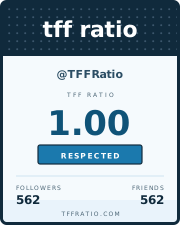
<a href="https://tffratio.com/history.aspx/TFFRatio/" title="TFF Ratio history for TFFRatio"><img src="https://tffratio.com/services/badge/TFFRatio.svg" width="180" height="225" alt="TFF Ratio badge for TFFRatio" border="0"></a>About the badge service
The original site offered a badge image from a single URL: http://twitterratio.com/services/badge.ashx?handle=HANDLE. Every history page carried a text area with that image wrapped in a link, ready to paste into a blog, a profile page, or an old social network.
This rebuild keeps the shape of that badge and replaces the live image service with a set of prebuilt SVGs. The result loads quickly, stays crisp at any size, and does not depend on a retired Twitter connection.
Good to know: the badge shows the archived followers, friends, ratio, and tier. If a handle later changes its counts, the image stays at the captured reading.
Why the URL changed
The old service needed a server side image generator. A static site cannot answer a query string that way, so each reading now has its own SVG file. The embed code points at the new path, and the old pattern remains documented on the API page.
Badge sizes and placement
The image is 180 by 225 pixels, tall enough for a sidebar and narrow enough for a blog column. Keep the width and height attributes in the embed code so the page does not jump while the image loads.
For a short page, place the badge after your own profile details. For a long sidebar, place it near the top where a reader can see the ratio without scrolling. The badge has a dark header and a light body, so it reads well on both light and dark backgrounds.